Ecommerce performance · 14 min read
Google Shopping feed optimization: a practical ecommerce framework
Google Shopping feed optimization is the discipline of making every product accurate, distinct, current and verifiable across Merchant Center and the landing page. Better bidding cannot compensate for a catalogue that sends the wrong identity, variant, price or availability.
The direct answer: your product feed is sales inventory, not a technical export
Google Shopping feed optimization means giving each product in Merchant Center an accurate, complete and sufficiently specific data record that agrees with its product page. Google uses product data to match offers with relevant queries and as foundational input for ads, free listings and AI-powered formats. A stronger bid cannot repair the wrong title, price, stock status, variant or identifier.
Start with the system of record in the store, then fix feed mapping, then tailor channel-specific copy. The feed should not become an isolated collection of overrides that drifts away from the website after a few weeks. A reliable system carries the same stable product ID, variant, price and availability from the catalogue to the landing page.
NUMEDIA therefore treats the feed as a shared ecommerce, content, engineering and media responsibility. The objective is not to fill the largest possible number of fields. It is to create a catalogue that gives Google and the customer the same verifiable offer while making errors easy for the team to identify and resolve.
Why campaign settings cannot rescue weak catalogue data
Shopping ads do not rely on a conventional keyword list and a manually written ad for every query. The system interprets the offer mainly through product data, the landing page and campaign signals. A generic title, missing colour or incorrectly grouped variant removes useful context before the product reaches the right comparison.
Google's product data specification states that missing, inaccurate or conflicting information can lead to disapproval, limited eligibility or an incorrect display. It specifically calls out categories, GTINs, variant attributes, images and conflicts between the feed and the website. This sets an important boundary: optimization is about accuracy and distinction, not inserting more promotional adjectives.
Separate three failure types. A technical error prevents processing or refresh. An eligibility issue limits where an item can appear. A quality gap leaves the product active but removes context that could help the system understand it. Each class needs a different owner and service level.
| Layer | Core question | Example control |
|---|---|---|
| Identity | Which exact product or variant is this? | Stable ID, GTIN or brand and MPN, item_group_id |
| Meaning | What is the product and who is it for? | Title, description, product type, category, material, use case |
| Offer | Can the customer buy it on the displayed terms? | Price, sale price, availability, shipping, returns |
| Evidence | Do the feed, page and structured data agree? | Price, stock, variant and URL reconciliation |
| Measurement | Can results be tied back to a product segment? | Product ID, business labels and conversion value |
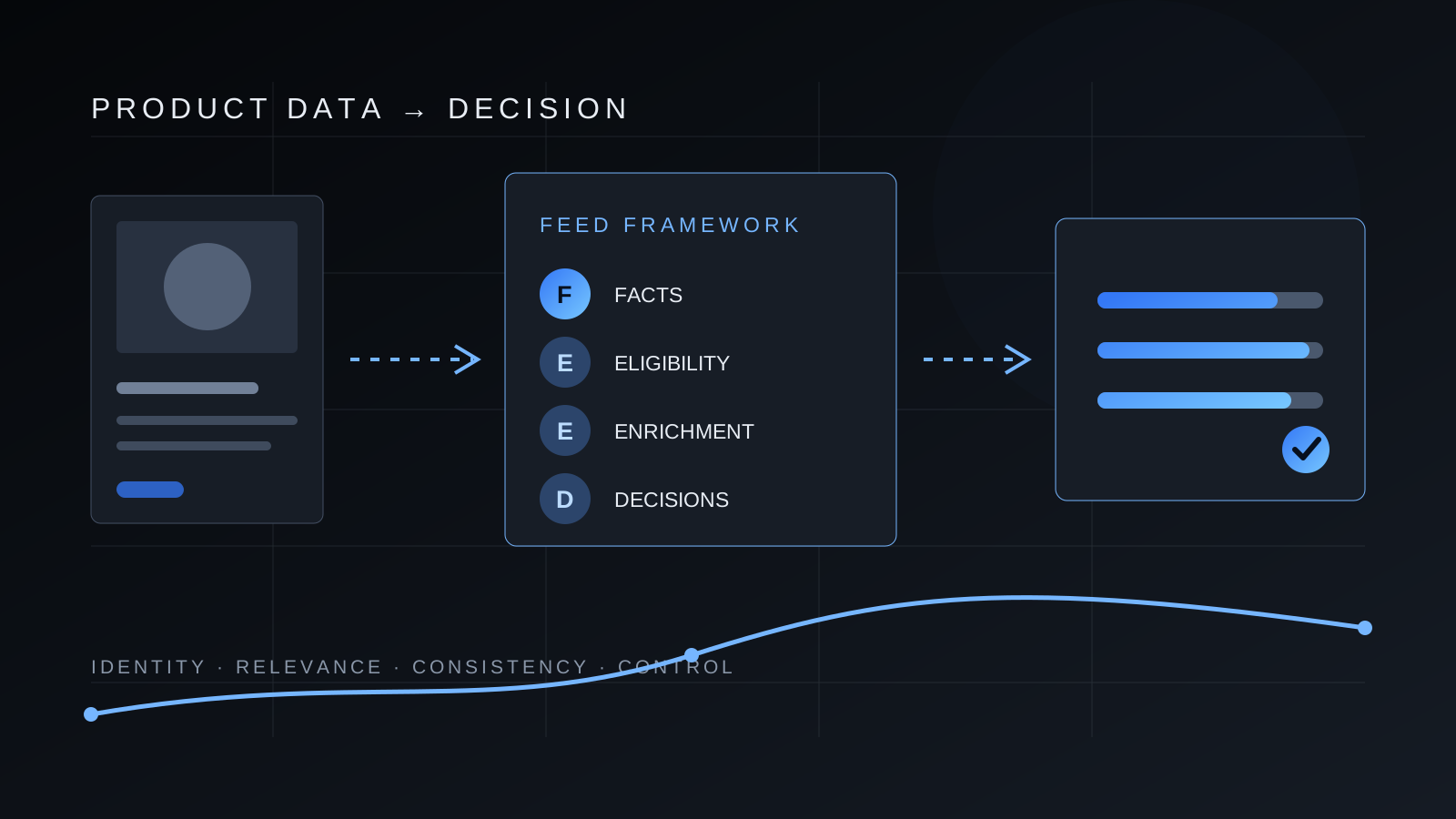
The FEED framework: four layers from source to decision
F is Facts. Lock the identity, name, brand, identifiers, variant, price, availability and destination URL for every SKU. Each field should originate in the system that actually owns it. Stock belongs in the commerce or inventory system, not in a media team's manual spreadsheet.
The first E is Eligibility. Check required attributes, supported values, images, landing pages, shipping and returns for each target market. A product that exists in a data source is not automatically eligible for every destination and country.
The second E is Enrichment. Add attributes that genuinely distinguish products and variants, such as product type, gender, age group, colour, size, material, pattern, compatibility or other category-specific properties. Enrichment must never invent a feature or conflict with the page.
D is Decisions. Segment products so the team can see which group has errors, receives impressions, earns clicks or converts, and which group needs a different offer. Optimization is complete only when the data supports an action, not when the feed merely becomes longer.
Titles and descriptions should identify the product, not imitate ad copy
Google requires the title to describe the product clearly, match the landing page and include distinguishing variant features. Promotional phrases, emphasis through capital letters and attention tricks do not belong in the title. Place the most meaningful entities early because titles can be shortened in different placements.
Title templates should follow how shoppers distinguish products within a category. Apparel may benefit from brand, product type, audience, defining feature, colour and size. A technical catalogue may need brand, model, product type, capacity and compatibility. One universal template across the entire catalogue usually adds noise.
The description expands on verified product facts. Include useful features, materials, dimensions, intended use and limitations, but keep it specific to the item. Google excludes store links, competitor references and sales information that does not describe the product. When generative AI creates product text, the current specification provides structured fields and source labels, so automation needs validation before publication.
- The title identifies the exact product and variant.
- The decisive attribute appears early enough in the title.
- The description contains verifiable product facts rather than generic promises.
- Colour, size, material and other attributes use controlled values.
- The title, description and selected variant agree with the landing page.
- AI-generated text is reviewed and labelled according to the current specification.
Identifiers and variants keep the catalogue intelligible
GTIN, brand and MPN help Google understand which product you sell. Use identifiers assigned by the manufacturer. Do not invent a GTIN or reuse one value across different products. When a product has no assigned standard identifier, represent that condition according to the specification instead of filling the field with a guess.
Every variant needs its own stable ID and its own colour, size or other defining values, while related variants share an item_group_id. The image, URL, price and availability must belong to that exact variant. A common failure sends every size to the default selection or displays an image that does not match the selected colour.
ID stability matters operationally. Google recommends keeping the same ID when product data is updated. Unnecessary changes break continuity between the catalogue, reporting and campaigns. Change an ID when the offer's identity truly changes, not whenever a title is edited.
Price, availability, images and the landing page must form one record
Price and availability should agree across the feed, product page, structured data and checkout. When these values change frequently, increase refresh frequency and fix latency at the source. Merchant Center automatic updates can help reconcile price and availability when Google detects valid structured data on the page, but they are a safety layer, not a replacement for a reliable feed.
The primary image should show the product accurately, remain crawlable and avoid promotional text, watermarks or generic placeholders. Additional images can show other angles or the product in use. Variant consistency is especially important for colours, patterns and bundles.
Google Search Central recommends combining a Merchant Center feed with Product structured data because the two inputs expand eligibility across shopping experiences and help Google verify the information. The operating principle is simple: the feed, schema and visible page are not separate marketing channels. They are three representations of one offer.
Prioritize issues by lost eligibility and affected inventory
Begin with account-level issues and disapproved products because they can stop distribution entirely. Then resolve warnings that limit destinations or markets and recurring price or availability conflicts. Only after that should the team refine copy for active items. This sequence prevents careful title work on products that cannot appear.
Trace every issue to its source. If a thousand items lack GTINs, repair the catalogue or PIM instead of creating a thousand Merchant Center overrides. If price conflicts happen only during promotions, inspect feed timing, sale_price and effective dates. If an issue affects one country, review local language, currency, shipping and landing-page requirements.
Maintain a concise change log with the date, segment, edited field and expected outcome. Without it, the team cannot distinguish a feed effect from a price change, budget adjustment or seasonal demand.
| Priority | Example | Action |
|---|---|---|
| P0 | Account issue or large-scale disapproval | Pause lower-value work, resolve the cause and verify reprocessing |
| P1 | Wrong price, availability, URL or identity | Repair the source and sync, then reconcile with the page |
| P2 | Missing attributes in an important segment | Improve the template or PIM and validate a variant sample |
| P3 | Vague titles or weak images on active products | Test by category and monitor traffic quality |
| P4 | Additional reporting segmentation | Add controlled labels with a defined business use |
A 30-day optimization plan without chaotic rewrites
During week one, export products and issues and establish a baseline: disapproval rate, identifier gaps, price and availability conflicts, variant completeness and coverage of critical attributes. Select one commercially important category instead of changing the full catalogue at once.
During week two, repair source data and mapping. Assign field owners, stable IDs, variant rules, refresh frequency and pre-submission validation. For a product sample, compare the feed, structured data, visible page and the actual selection carried into the cart.
During week three, build category-specific title and description templates, fill proven attribute gaps and improve images where the defect is clear. Release changes to a measurable segment and allow time for processing and ordinary demand variation.
During week four, review both operational and market outcomes. Operational measures include active products, warnings, freshness and conflicts. Market measures include impressions, clicks, conversion rate and value for the same segment. Do not attribute every movement to the feed without a comparable period or test. Keep changes that improve data quality and performance, then repeat the framework for the next category.
Sources and methodology
- Product data specification (Google Merchant Center Help, accessed 29 September 2026)
- About unique product identifiers (Google Merchant Center Help, accessed 29 September 2026)
- Allow Merchant Center to update product information automatically (Google Merchant Center Help, accessed 29 September 2026)
- Introduction to Product structured data (Google Search Central, accessed 29 September 2026)
- Tips to optimize your product data (Google Merchant Center Help, accessed 29 September 2026)
Frequently asked questions
What is a product feed?
A product feed is a structured source containing fields such as product ID, title, description, image, price, availability and attributes. Merchant Center uses it for Shopping ads, free listings and other Google shopping experiences.
Which fields matter most for Google Shopping?
Start with accurate product identity, a stable ID, title, description, URL, image, price and availability. Then add identifiers, variants, category attributes, shipping and returns according to the product and target market.
Should product titles contain keywords?
Use natural terms and attributes that help shoppers identify the product, but keep the title an accurate description of the offer. Avoid repetition, promotional phrases and features the product does not have.
Can Merchant Center fix price and availability automatically?
Automatic updates can reconcile these values with structured data detected on the page, but they do not replace a timely and accurate source. Recurring discrepancies should be fixed in the store or integration.
How often should a feed refresh?
Often enough to keep price and availability aligned with the live store. The right frequency depends on catalogue, promotion and inventory volatility, so define it from the maximum delay the business can tolerate.
How do you measure feed optimization?
Track data quality and commercial outcomes separately. Quality measures include eligibility, errors, freshness and attribute coverage. Performance measures include impressions, clicks, conversion rate and value for the same segment in a comparable period or experiment.